|
|
|

|
|
|
NoError47 Template |
|
|
|
|
|
|
|
Introduction |
|
|
|
| We consider this to be a white box template. On the other hand it uses | |
| Clarion TPSFix.EXE file recovery utility, which is a black box program. | |
| While fighting a data file corruption we accidentally discovered that this tool | |
| can be used not only for fixing corrupted data files, but also for conversion of changed | |
| data files - plus it functions with amazing speed. So this tool is especially useful | |
| where conversion speed matters. For instance, we are using this converter for one of our | |
| clients who runs an application 24 hours a day and has some large TPS files, | |
| some 100 Mb each. Until recently, we had to paralyze their work completely for | |
| 10 hours or so just to add one key to one of those files. Now with NoErro47 the same | |
| procedure takes 15-20 minutes. And they certainly appreciate it... | |
| Download NoError47 demo program to see for yourself | |
| Main advantages: | |
|
|
| Some Restrictions: | |
|
|
| As seen from those restrictions, NoError47 Template appears to be useful in well established | |
| databases, where you can go just with minor dictionary changes. To the best of our knowledge | |
| there are no restrictions for key changes so you can do absolutely anything you | |
| want to them. As to the file fields - some programming discipline is required | |
Installation |
|
| Run the installation wizard. It will guide you through a few simple steps. That is it. | |
| IMPORTANT: If you are using Clarion 5-6, after selecting Clarion5-Clarion6 directory wizard | |
| will offer to install it into C:\Clarion5(6)\Clarion8 or C:\C55\Clarion8 directory respectively. | |
| So don't forget to remove last \Clarion8. But even if you do - no problem. | |
| Just uninstall the template and re-run the installation. | |
| To start using the template you need to manually register it. | |
| To do this: Open Clarion (no application must be open). | |
| Go to menu Tools (Setup) -> (Edit) Template Registry -> Register. | |
| Select new template NoErr47.tpl and then hit Open button | |
| You can find it in Clarion7(8,9,10...)\accessory\template\win | |
| for Clarion >= 7 and in Clarion*\Template - for all others. | |
| View animated reminder on how to do this - Registering Template | |
| (built with our JAVA Animated Help Builder). | |
|
|
|
| One Executable Applications | |
| 1. Open Global -> File Control (second tab) of your application and ensure that | |
| Generate all file declarations checkbox is checked | |
| 2. Open the mainframe procedure property and insert NoError47 extension template | |
| Make sure that the mainframe procedure has no | |
| files in the file schematic. That basically is it. | |
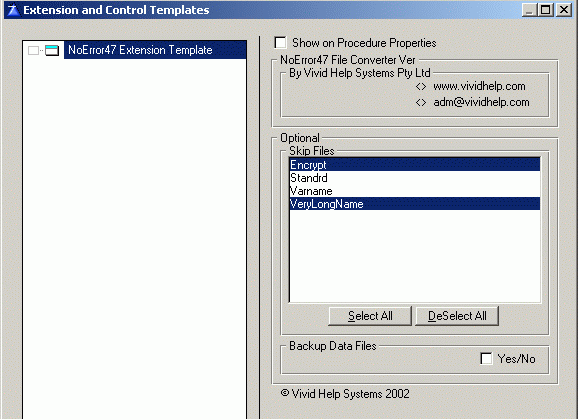
| 3. If for any reason you don't want some files to be processed | |
| (for instance you may have data files in your dictionary other then TOPSPEED ones) | |
| find and Insert them in the Skip Files list box (see the picture above) | |
| By default the template will backup all files in TPSFix.EXE manner (FileName.TP1, FileName.TP2 etc.) | |
| To suspend this behaviour - tick the checkbox Backup Data Files | |
| Multi-DLL Applications | |
| You should follow the same 3 steps to install NoErro47 template. The only difference - | |
| All file declarations should be generated in your main DLL which exports all file declarations, | |
| template globals and ABC stuff (for ABC). The NoError47 template still has to be installed | |
| in the Mainframe of your executable only. | |
| IMPORTANT: NoError47 does not keep a history of your changes so it works in a similar manner to | |
| the built-in Dictionary file converter. Hence to use it successfully you need to | |
| follow these few simple rules. | |
| You can: | |
|
|
| You can not: | |
|
|
| Standalone NoError47 Converter | |
| If you want your program users to be able to launch a conversion themselves, you have to | |
| create a new EXE using the same dictionary (say you call it yourconv.EXE and you run your | |
| main application from C:\YourWorkDir). The steps are absolutely the same as for | |
| building One Executable Applications. After this you can call yourconv.EXE either from | |
| outside of your program or from any button or menu item within it. The only thing to bear | |
| in mind - if your data are kept in any other directory than your working directory you need | |
| to pass its name as the first command line parameter. The syntax is simple: | |
|
|
| Have a look at the example we are shipping with this template for details | |
| Examples | |
| We've installed an example into your Clarion*\Examples\VhNe47\Demo | |
| Or Clarion7(8,9,10...)\Lessons\VhNe47\Demo in Clarion 7-10.... | |
| Error47ed files are stored in the subdirectory /Orig so you can compare them with | |
| converted files say with TopScan program | |
| The TPS data files for the demo were generated with the Clarion Data modeller | |
| So the content of all those fields is meaningless | |
| Beautification | |
| You can easily customize those two windows which pop up before and after file conversion | |
| without changing the template. We've put them in the TRN file noe47win.trn which you can find | |
| in your Clarion*/Libsrc directory. To simplify this we suggest you | |
| open this file from Clarion. In this case you will be able to edit those windows visually. | |
| Just put the cursor anywhere in the window definition and hit the magic Format button. | |
| Shipping | |
| You need to ship the latest version of TPSFix.EXE program with your application, | |
| which for your convenience we've included into the NoError47 Installation program | |
| The one million dollar question is which TPSFix.EXE to use? Some of them are pretty | |
| buggy and just don't do the job. The best one is from Clarion6 Gold. So if you | |
| own C6 this is the one. As it is an EXE, you can use it with all your applications | |
| C5, C55, C6. If you use C55 we recommend the version | |
| we use in the template example - of 7 Aug 2001, but not of 11 May 2002. | |
| As to C5, its own TPSFix.EXE cannot be used because it's pretty | |
| primitive. So to use this template with C5 applications you'll need to | |
| own C55 or C6 to borrow TPSFix.EXE from any of these. | |

|
|

|
|
|
Copyright © 2025 Vivid Help Systems Pty Ltd |
|